cameras, home server, Telegramrunning at the dachaUpdated:
📹 Smart cameras
Eight cameras at the dacha whose cloud app died. Now they live without it: a home viewer, a people detector and an AI that tells Telegram what happened.
Where it came from
I've had cameras at the dacha for years: eight around the perimeter, a recorder with a disk, the manufacturer's app. The app worked through someone else's cloud, and on 20 October that cloud simply stopped answering. The cameras were fine, the network was fine, and I couldn't see the yard.
I could have installed another app and waited for that one to die too. Instead I asked the AI: can we do without a cloud at all?
What came out of it
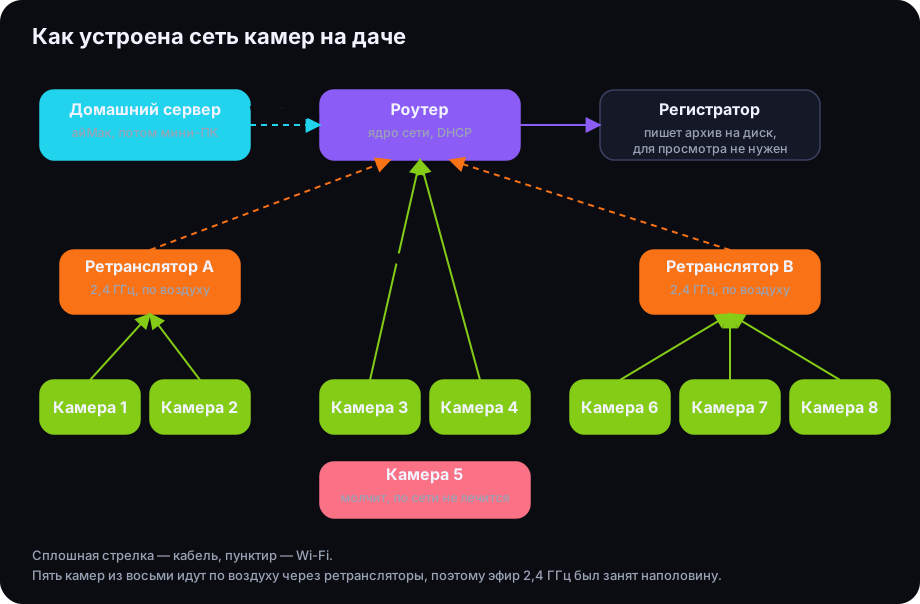
Turns out you can, even without the recorder. Each camera streams video into the network by itself; the recorder only writes it to disk. So the first thing we made was a browser page that shows all cameras in a grid and opens one full-screen on tap. It works from a phone on the home Wi-Fi, no cloud.
Then I wanted the cameras to tell me when something happens. First came a simple pixel motion detector. Then a real people-and-cars detector, which mistook a streetlight for a person thirty-three times in one night until we masked that spot. Then an AI that looks at the frames and decides whether it matters.
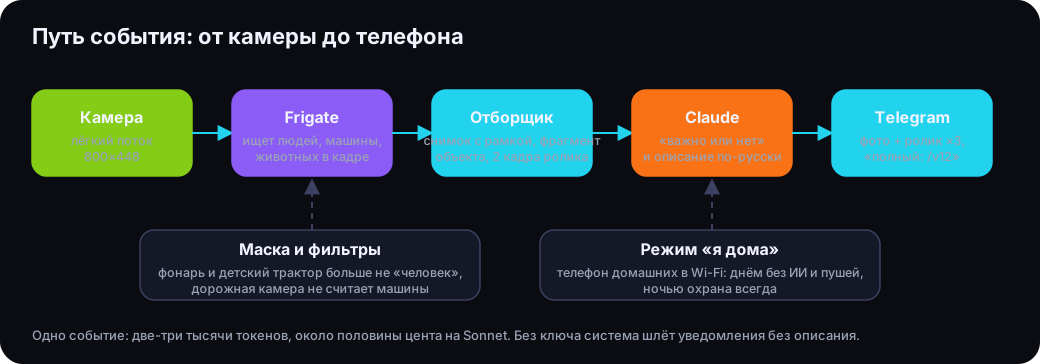
Today it looks like this: someone walks past a camera, and a few seconds later Telegram gets a photo of the object, a sped-up clip and one line from the AI: “a person walked along the fence towards the gate”. If it's just a parked car and a tractor, there is no alert.
What's inside, briefly
- Viewing. The cameras' light stream for the grid, the main one for full screen. The recorder isn't involved.
- Detector. Frigate, an open-source program that finds people, cars and animals in the frame. Masks where night light paints “people”.
- AI. Claude gets a snapshot with a box, an enlarged crop of the object and two clip frames, answers “important or not” and describes it. About half a cent per event.
- “I'm home” mode. If a family member's phone is on the Wi-Fi, the system stays quiet by day. At night it always guards.
- Telegram. Photo and sped-up clip as one album; the full recording on request.
What's left
One camera out of eight is silent and can't be revived over the network. The system is moving from the iMac to a mini PC wired into the router, because over Wi-Fi five of eight cameras barely fit. And access from outside the dacha.
Details, mistakes and numbers are in the posts below, in Russian for now.
Questions and answers
Can Chinese IP cameras be viewed without the cloud app?
Yes. Most such cameras stream video over standard RTSP straight into the home network. You need a program that takes the stream and shows it in a browser. The recorder isn't needed for that.
What does the AI do in a surveillance system?
The detector finds an object, and the AI looks at the frames, decides whether to bother a human, and describes what happened. Alerts stop coming for every streetlight and cat.
How much does it cost?
The software is free. Only the AI is paid: roughly half a cent per event, under a dollar a day on two cameras. Hardware: any old computer or a mini PC.